At a glance:
- You can usually access EAP services directly. Most EAPs accept self-referrals, so you don’t need to go through HR or your manager.
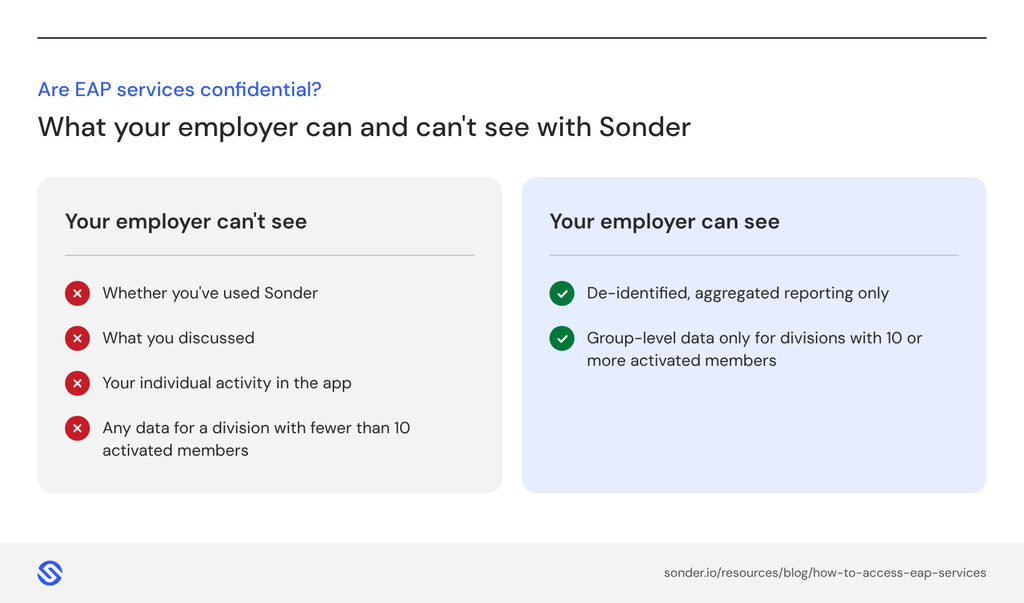
- It’s confidential. Your employer doesn’t see who has used the service or what was discussed.
- Access methods vary. Traditional EAPs usually use phone, email or an online portal and book counselling for a later date. Some providers offer 24/7 support through an app.
- Easy access drives uptake. Many employees can’t remember how to reach their EAP, which is one reason average usage is around 5% in Australia.
Employees can usually access EAP services by contacting their employee assistance program (EAP) provider directly, by phone, app, email or online portal. The contact details are typically shared at onboarding, on the intranet or through HR, and in most cases employees can self-refer without telling their manager.
How do I access EAP services?
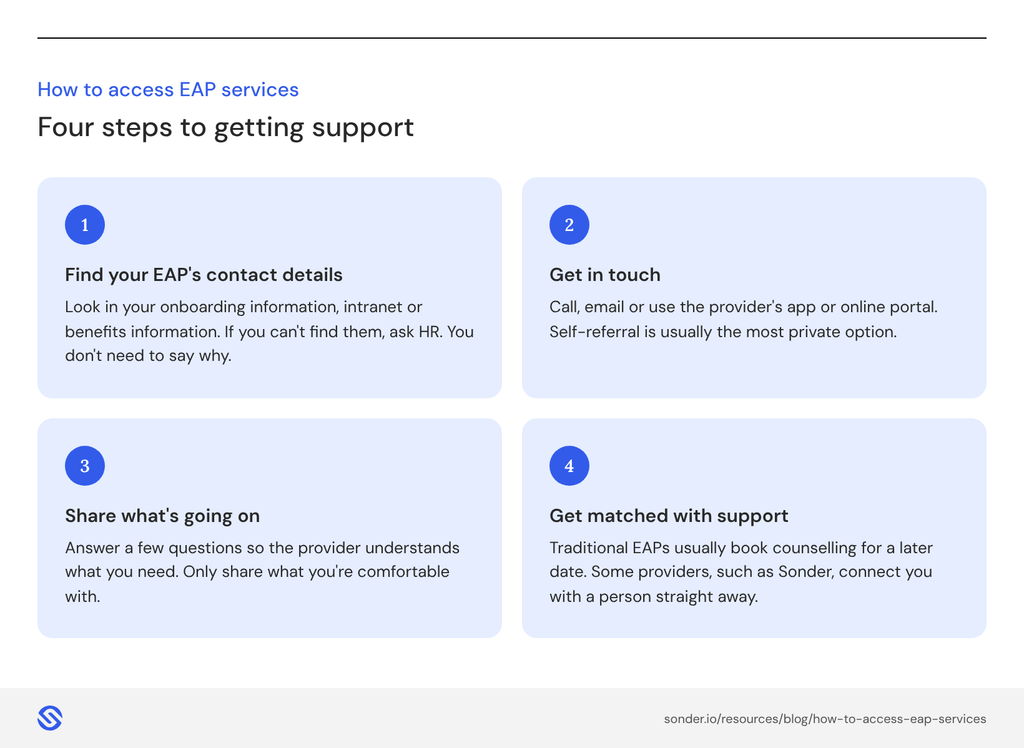
You can typically access EAP services in four steps: find your provider’s contact details, get in touch, share what’s going on and get matched with support.
Here’s how it works:
- Find your EAP’s contact details. Look in your onboarding information, on your intranet or in your benefits information. If you can’t find them, ask HR. You don’t need to say why.
- Get in touch. Call, email or use the provider’s app or online portal. Many providers also accept referrals from HR or a manager, but self-referral is usually the most private option.
- Share a little about what’s going on. You’ll be asked some questions so the provider can understand what you need. You only need to share what you’re comfortable with.
- Get matched with support. With a traditional EAP, this is usually a counselling session booked for a later date. Some providers, such as Sonder, connect you with a person straight away and match you with the right level of care.
Reaching out is often the hardest part. You don’t need to have the right words or know exactly what’s wrong. A good first conversation is about understanding what’s going on for you, and working out the next step together.

Registered Clinical Psychologist, Sonder
Do I need to go through HR to access EAP services?
Sometimes, but you can typically access EAP services by contacting the provider directly, which keeps your reasons private. HR or a manager may suggest the EAP or refer you, but you can always reach out yourself.
Having EAP details easy to find, for example on the intranet or in an app, means people don’t need to ask anyone to get support.
Are EAP services confidential?
Yes. EAP services are confidential, and the clinicians who provide them, including counsellors, psychologists and social workers, follow professional codes of ethics that protect your privacy. This is what makes it possible for people to speak openly about what they’re going through.
With Sonder, individual member activity isn’t visible to employers. Organisations only see de-identified, aggregated reporting, and if a division has fewer than 10 activated members, no data is shown for that group.
Read more about EAP confidentiality.
How do I access Sonder?
Sonder provides everything you’d expect from a traditional EAP, and more. It’s a people risk intelligence and prevention platform built on care that starts before crisis, so mental health, medical and safety support are all in one app, and available 24/7.
- Download the Sonder app and log in with the email address your organisation registered. You don’t need your activation email to get started.
- Press ‘Get Support’ to start a chat or call, any time of day or night. You’ll be connected with a real person within 30 seconds.
- Get the right care first time. Holistic triage looks at your mental health, medical, social and safety needs, then connects you with the right support, from self-help resources to counsellors, psychologists and nurse-led medical triage.
If you ever feel unsafe, the red Help button in the app connects you directly to Sonder’s safety team, who will answer within 30 seconds. Interpreters are available in over 300 languages, including Auslan.
‘My first contact and the triage nurse were so caring, patient and understanding that I immediately felt safe and open. I was also contacted the following day to book an appointment with a psychologist/counsellor.’
Sonder Member
Our advice is to download the Sonder app before you think you need it, so it’s quick and easy to access support when you do. Start with one of the wellbeing assessments, which will help personalise your experience in the app so you can get maximum value from the thousands of self-help wellbeing resources available.

How can employers make EAP services easier to access?
Employers can make an EAP service (or a modern alternative like Sonder) easier to access by keeping it simple, visible and always on. The easier support is to find, the more likely people are to use it early, before a concern becomes a crisis.
- Offer one entry point. A single place to go for any health, safety or wellbeing need is easier to remember than several separate services.
- Keep the details visible. Share them at onboarding, on the intranet and in manager guides, and remind people regularly, not just at launch.
- Make it available when people need it. Support that’s available 24/7 reaches people outside office hours, when many need it most.
- Help people set up before they need it. Around 40% of Sonder members typically activate, meaning they’ve downloaded the app and registered. That’s different from utilisation, but it means people are ready before they need support, rather than searching for it in the moment.
When choosing a health and wellbeing service, consider how easy it is for your people to access. Every Sonder customer gets the Sonder Toolkit, with launch materials, awareness campaigns, email templates and videos, and members receive activation emails to help them get set up. And if you choose Premium Onboarding, support doesn’t end at launch. Your Customer Insights Partner provides ongoing communications support to help you position Sonder for maximum impact, plus champion training sessions to embed Sonder and boost uptake.
For more ideas, read how to get your team to use your EAP.
Why is it hard to access EAP services?
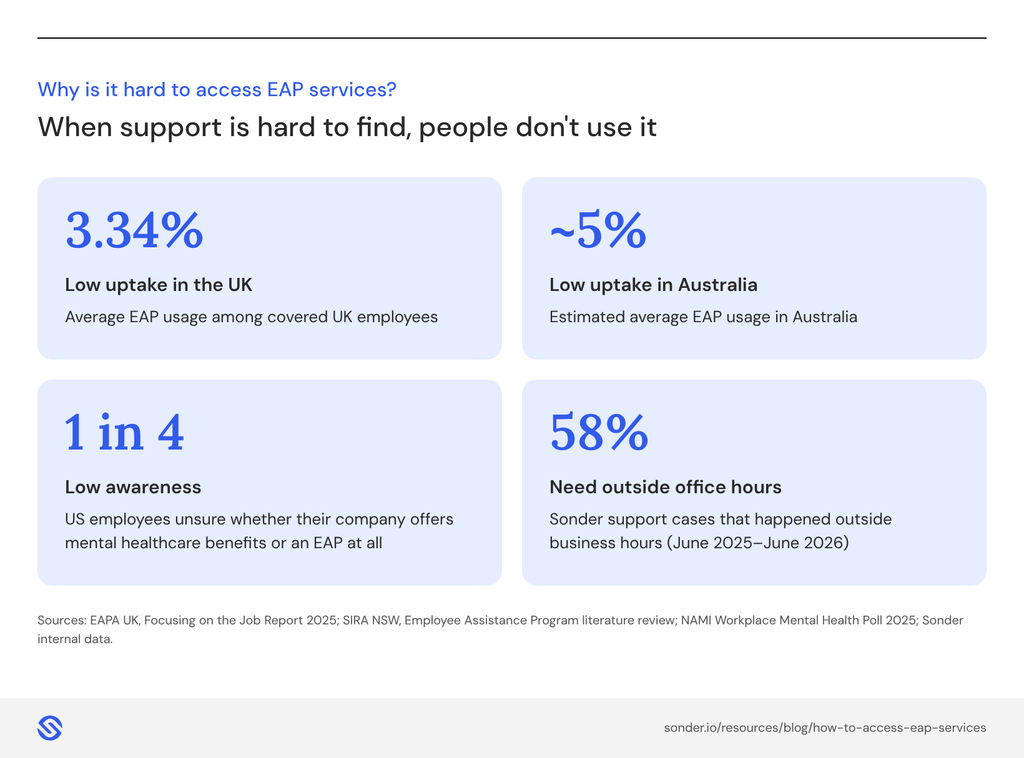
Accessing EAP services can be hard when people don’t know their EAP exists, or can’t remember how to reach it when they need it. That’s one reason the uptake of traditional EAPs remains low. In the UK, average EAP usage is just 3.34% of covered employees, and in Australia it’s estimated at around 5%.
Common barriers include:
- Low awareness or recall: EAP details shared at onboarding are easy to forget.
- A complex web of services: when organisations add extra apps and services, people can lose track of what’s available. In the US, one in four employees are unsure whether their company offers mental healthcare benefits or an EAP at all.
- Limited hours: some services are only open during business hours, but people often need help outside them. 58% of Sonder support cases between June 2025 and June 2026 happened outside business hours.
- Privacy worries: people may hold back if they think their employer will find out.
Compare your options
If you’re reviewing your EAP or coming up for renewal, our free guide will help you compare providers, including how easy each one is for your people to access and use.
Download: How to compare EAPs: An insider’s guide (2026)
Frequently asked questions about EAP Services
An EAP is an employer-funded program that offers employees, and often their immediate family members, confidential support for personal and work-related problems. Traditionally, EAPs focus on short-term counselling, with some also offering legal advice or financial guidance.
EAPs are widespread. In Australia, around 80% of the top 500 companies have one. Find out more in What is an EAP?
You can typically access EAP services by contacting your EAP provider directly, using the details your employer has shared, usually in your onboarding information, on your intranet or through HR. Most providers can be reached by phone, email, an online portal or an app. In most cases you can self-refer without telling your manager.
Usually not. Most EAPs accept self-referrals, so you can contact the provider directly and keep your reasons private. If you can’t find the contact details, HR can share them without needing to know why you’re asking.
No. EAP services are confidential, and employers don’t see who has used the service or what was discussed. Reputable providers share only de-identified, aggregated reporting, often with minimum group sizes, so no individual can be identified.
Contact your EAP and explain that you’d like to speak with someone. With a traditional EAP, they’ll usually book a counselling session for a later date. Some providers connect you with a person straight away, then arrange ongoing sessions if you need them.
It depends on the provider. Many EAPs offer counselling by phone or video as well as in person, which can make it easier to fit around work, travel and family. Check your organisation’s EAP details, or ask HR, for the options available to you.
It depends on your EAP and your needs. Some employers set a limit as part of their EAP. With Sonder, the number of sessions is decided by your treating clinician, based on your needs and progress, rather than by your manager.
Often, yes. Many EAPs extend support to immediate family members, but it depends on the provider and on what your employer has chosen. With Sonder, Family Access is an optional feature, so check with HR whether it’s included for your organisation.
Check your onboarding information, intranet or benefits portal first. If they’re not there, ask HR or your manager for the provider’s contact details. You don’t need to explain why. If you’re in immediate danger, contact emergency services.
Many providers offer interpreters. Sonder offers interpreter services in over 300 languages, including Indigenous languages and Auslan, for phone calls and booked therapy sessions. Let the person you speak with know you’d like support in another language.
Download the Sonder app and log in with the email address your organisation registered. Then press ‘Get Support’ to start a chat or call, any time of day or night. You’ll be connected with a real person who’ll help you find the right support.